The Best AI Tools for First-Time Founders in 2026
 By Cuong Nguyen, Founder of BuildYourBusinessUpdated May 20269 min read
There is no single best AI tool for first-time founders. The right one depends on the job: validating the idea, shaping the plan, building the product, or actually executing. Most founders need two or three, not ten.
It is tempting to look for the one tool that does everything. That tool does not exist, and the ones that claim to usually do each part shallowly. A better question than "what is the best AI tool" is "what job am I trying to get done right now," because a first-time founder needs different help at different moments. Early on you need honest thinking and real validation. Then you need to shape a plan around your actual numbers. Then maybe a simple site, and the boring admin handled. And once you are moving, you need something that keeps the plan connected to what you do each week. This guide maps the real landscape by the job you need done, names the tools founders actually reach for, and is honest about where each one stops.
What should a first-time founder actually use AI for?
Use AI for the parts that are slow, structured, or easy to put off, and keep the judgment for yourself. AI is genuinely good at giving you a structured first draft, organizing messy thoughts, summarizing research, and catching things you forgot. It is not good at knowing your customer, setting your price, or deciding what to do when reality surprises you. The founders who get the most from AI treat it as a fast, tireless assistant that handles the scaffolding, while they keep the decisions. The mistake is handing it the decisions and trusting a confident answer you did not check.
The best AI tools by the job you need done
| The job | What to look for | Tools founders reach for |
|---|---|---|
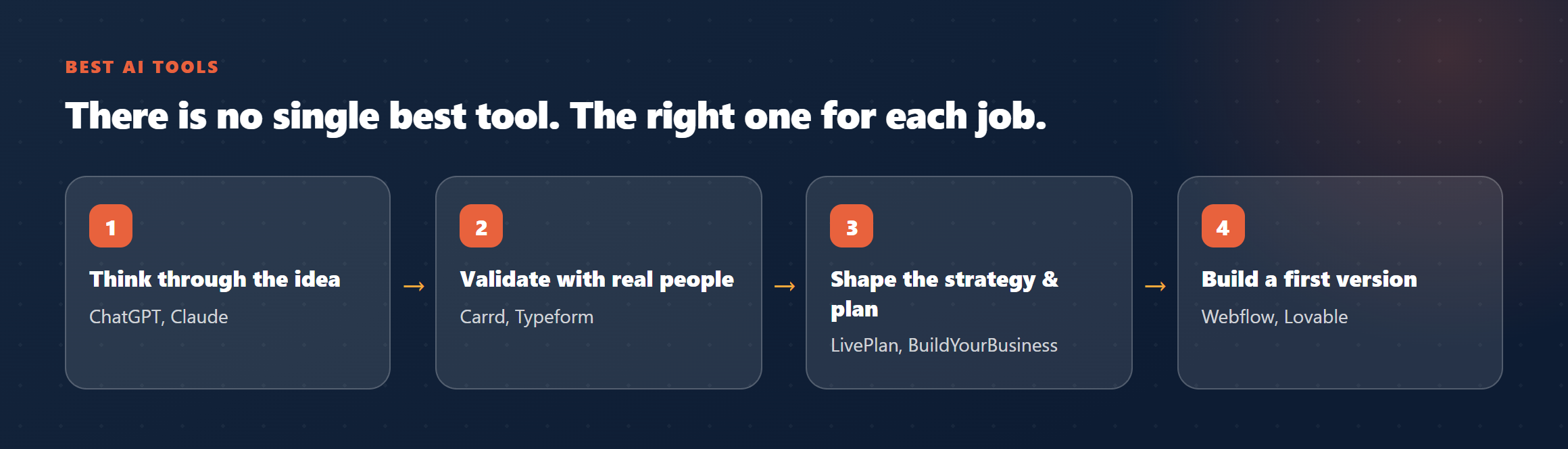
| Think through the idea | Honest pushback, not just encouragement | ChatGPT, Claude, and AI feasibility tools |
| Validate with real people | A fast landing page and a simple survey | Carrd, Typeform |
| Shape the strategy and plan | Structure plus room for your real numbers | LivePlan, AI plan tools (IdeaBuddy, Bizplanr), BuildYourBusiness |
| Build a site or first version | Speed without needing to code | Webflow, Lovable |
| Run the money and admin | The boring parts, done reliably | Accounting and invoicing apps |
| Actually execute, day to day | A plan that adapts as you go | BuildYourBusiness |
Notice that most tools cover one column. A landing-page tool does not help you execute. A plan generator does not validate your idea. This is normal. The skill is knowing which job you are on and reaching for the tool built for it, rather than expecting one product to carry the whole journey.
What to look for before you commit to a tool
- Does it fit a first-timer? Some tools assume you already speak in unit economics and funnels. If a tool needs you to know the jargon before it helps, it is built for someone further along.
- Does it use your real situation, or generic templates? A plan that could belong to any business is not worth much. Look for tools that adapt to your industry, budget, and stage.
- Does it stop at the document, or keep going? Most tools hand you an output and disappear. The harder, more valuable help is what happens after the plan, when you are actually building.
- Is it honest about its limits? A tool that claims to do everything is usually the one to distrust.
The numbers: why the right tool matters
- The most-cited reason startups fail is building something with no real market need, named in 42% of failures. A tool that helps you validate first is worth more than one that just makes a prettier plan. (CB Insights, Top Reasons Startups Fail)
- About half of new businesses are gone within five years, and a common cause is failing to adapt as conditions change, which is an execution problem, not a planning one. (U.S. Bureau of Labor Statistics)
What this looks like in practice
Picture a first-time founder with a candle business idea. She uses ChatGPT to pressure-test the idea and sharpen her one-line pitch. She puts up a Carrd landing page and runs a Typeform survey to see if real people will pre-order, which they do. She then needs a real plan around her actual costs and a way to keep moving once she starts, which is a different job than a chat window does well. Three tools, three jobs, none of them pretending to be all of them. That is what a healthy stack looks like for a first-timer.
What no AI tool can do for you
No AI tool, including this one, can make the decisions for you, do the customer conversations, or supply the persistence. Be especially wary of any tool that promises to do the whole journey end to end, because the ones that try usually do each part shallowly. The honest version is that AI removes the busywork and the blank page, so your time goes to the few choices that actually decide whether the business works. Those choices are still yours.
Frequently asked questions
Is ChatGPT enough on its own for a first-time founder?
For thinking out loud and drafting, it is excellent. For validating with real people, keeping a plan connected to your week, and knowing your specific numbers, it is not designed for that. It is one tool in the stack, not the whole stack.
Do I need to pay for AI tools when I am just starting?
Mostly no. The thinking tools have free tiers, a landing page can cost almost nothing, and real validation is conversations, which are free. Pay once a tool clearly saves you time you do not have.
How many tools should I actually use?
Two or three at a time, matched to the job you are on. A long stack of tools is usually a sign of avoiding the real work, which is talking to customers and making decisions.
One place that carries the idea all the way to execution
Most tools cover one job and stop. BuildYourBusiness connects them: it pressure-tests your idea, builds a plan around your real situation, and then keeps walking beside you through the side-by-side execution model, adapting as reality changes. It is the part after the plan that no point tool covers. Free to start. No card needed.
Start with my idea